
If you want to pay for a server with crypto, the best Bitcoin VPS hosting provider for most people in 2026 is BitLaunch. It accepts 50+ cryptocurrencies, needs only an email address to sign up, and gives you access to several infrastructure providers from one dashboard. Cherry Servers is the best alternative for developers, while OrangeWebsite leads for privacy-focused hosting.
This guide compares eight trusted VPS hosts that accept Bitcoin, covering anonymous VPS hosting, offshore privacy, developer-friendly options and beginner picks. For each one you get the crypto payment options, locations, starting price, support and the honest downsides, so you can choose a server and pay with BTC with confidence.
Need real anonymity? See our anonymous VPS guide
Quick Answer: The Best Bitcoin VPS Hosting Providers in 2026
- Best overall: BitLaunch, with 50+ cryptocurrencies, email-only signup and several upstream providers
- Best for developers: Cherry Servers, with hourly billing, full root access and 80+ payment methods
- Best for privacy in Iceland: OrangeWebsite, with strong jurisdiction and free SSL
- Best for long-term value: InterServer, with a price lock guarantee and US-based support
- Best global coverage: Vultr, with 30+ locations and hourly billing
- Best for beginners: Hostinger, with templates, a simple panel and 24/7 support
Bitcoin VPS Hosting Comparison Table (2026)
Use this table to compare every provider at a glance. Prices are starting prices and can change, so confirm the current rate on the provider’s site before you pay.
| Rank | Provider | Best for | Starting price | Locations | Anonymous signup |
|---|---|---|---|---|---|
| 1 | BitLaunch | Overall and anonymity | Varies by provider | 20+ regions | Yes (email only) |
| 2 | Cherry Servers | Developers | From ~$5.83/mo | 6 locations | Not guaranteed |
| 3 | OrangeWebsite | Privacy / Iceland | From ~$15/mo | Iceland | Privacy-focused |
| 4 | InterServer | Long-term value | Slice-based, price lock | US data centers | No |
| 5 | Vultr | Global reach | Low-cost entry plans | 30+ regions | No |
| 6 | VPSDime | Budget / high RAM | Low-cost plans | US locations | No |
| 7 | Hostinger | Beginners | Low intro pricing | Multiple continents | No |
| 8 | Ultahost | Managed + migration | From ~$5.50/mo | Global | No |
Bitcoin VPS providers compared, October 2026
How We Chose the Best Bitcoin VPS Hosts
We did not pick hosts just because they accept Bitcoin. Each provider was assessed on the factors that matter when you pay with crypto:
- Payment reliability: whether Bitcoin is accepted directly and processed without problems
- Reputation and track record: how long the company has operated and what customers report
- Privacy and signup requirements: how much personal data is needed and where the servers are located
- Server quality: hardware, network, locations, root access and uptime commitments
- Value for money: starting price, billing options and what is included
- Support and documentation: availability, channels and helpfulness
We only list hosts we consider trustworthy for readers. Placement is based on the criteria above, and we update this page regularly as plans, prices and policies change.
How to Pay for a VPS With Bitcoin
- Pick a provider and plan. Choose the location, operating system and resources you need.
- Select crypto at checkout. Choose Bitcoin or Crypto as the payment method. Some hosts use a prepaid balance that you top up instead.
- Send the exact amount. Copy the wallet address or scan the QR code and send exactly what the invoice shows, with the network fee covered by your wallet.
- Wait for confirmations. Your server is usually activated once the payment has the required blockchain confirmations.
- Secure the server. Update the system, use SSH keys, disable password login and enable a firewall.
Tip: Crypto payments are usually final. Start with a one-month or hourly plan, confirm the server meets your needs, and only then prepay for longer.
The 8 Best Bitcoin VPS Hosting Providers in 2026
1. BitLaunch: Best Overall and Best for Anonymous Signup
Website: bitlaunch.io
BitLaunch is the most flexible way to buy a VPS with Bitcoin. It runs its own infrastructure and also resells servers from big-name providers such as Vultr, DigitalOcean and Linode, so you can pay in crypto for providers that normally won’t take it. Think of it as a crypto-powered VPS marketplace with one dashboard.
Best for: anonymous VPS hosting, crypto-only payers, and anyone who wants to choose between several infrastructure providers in one place.
Key Features
- Choose from 4 hosts: BitLaunch, DigitalOcean, Vultr and Linode
- 20+ global regions across its connected providers
- 50+ supported cryptocurrencies, including BTC, ETH and LTC
- Choose your OS, CPU, RAM and disk from a single dashboard
- 24/7 live chat support
Why BitLaunch Stands Out
Some of the providers BitLaunch connects you to don’t accept cryptocurrency directly. Through BitLaunch you can still pay them in crypto, so it works as a crypto-friendly gateway to premium VPS hosts.
Because four hosts sit under one roof, your options are wide. Each host has different strengths, so the “Create Server” screen shows the key differences before you commit:
| Host | DDoS Protection | Bandwidth | Nested Virtualization | Backups |
|---|---|---|---|---|
| BitLaunch | Included | Unlimited transfer | Yes | Not available |
| DigitalOcean | Included | Unlimited transfer | Yes | Available |
| Vultr | Not included | Transfer overages apply | No | Available |
| Linode | Included | Unlimited transfer | No | Available |
In short, BitLaunch’s own servers are the best fit if you want built-in DDoS protection, unlimited transfer and nested virtualization, but you’ll need to handle backups yourself. If backups matter more, DigitalOcean offers the same feature set plus backups. Vultr is the one to double-check, since it has no built-in DDoS protection and charges for transfer overages.
Hardware and Operating Systems
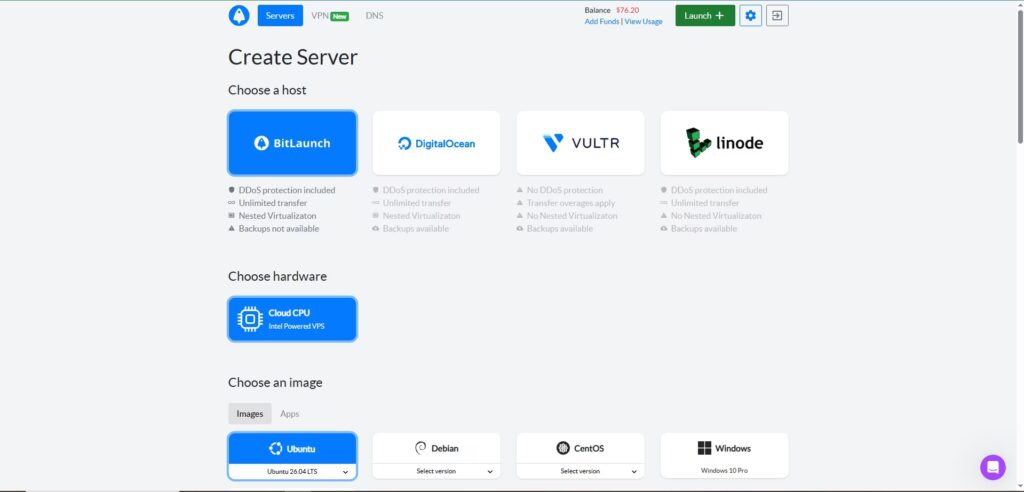
BitLaunch’s own hosting runs on Cloud CPU (Intel-powered VPS), and you get full root access on an unmanaged server.
For the OS image, you can pick from:
- Ubuntu (the latest LTS release is available), plus Ubuntu Desktop
- Debian
- CentOS
- Windows (Windows 10 Pro)
- Apps, a separate tab of preconfigured application images
This is handy if you want a ready-to-run Linux server, a full desktop environment, or a Windows VPS for remote work.
Datacenter Locations
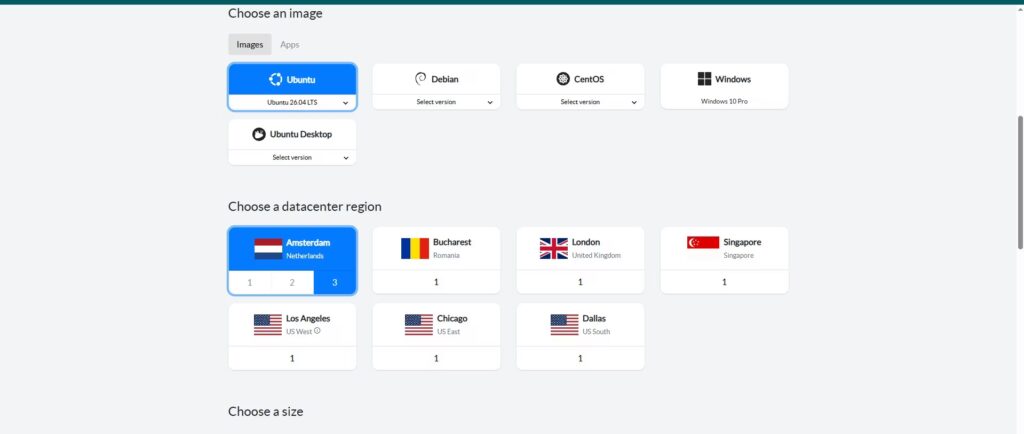
On BitLaunch’s own infrastructure, you can deploy in seven regions:
| Region | Location | Datacenters |
|---|---|---|
| Amsterdam | Netherlands | 3 |
| Bucharest | Romania | 1 |
| London | United Kingdom | 1 |
| Singapore | Singapore | 1 |
| Los Angeles | US West | 1 |
| Chicago | US East | 1 |
| Dallas | US South | 1 |
Amsterdam stands out with three separate datacenters to pick from, which is useful for spreading servers across facilities. The mix covers Europe, Asia and all three main US zones (West, East and South), so you can place your server close to your audience for lower latency. If your preferred city isn’t offered by BitLaunch itself, switch to DigitalOcean, Vultr or Linode and check their region lists, which together bring the total to 20+ regions.
My Experience with BitLaunch
I’ve used BitLaunch myself, and support is one of the things that stood out most. The team replied quickly and was genuinely helpful, which is a big contrast to the long chat waits I’ve seen with some other providers. The dashboard and control panel are also modern and easy to use, so picking a host, region, OS and server size takes only a few clicks. So far I haven’t run into any downtime or problems.
BitLaunch at a Glance
| Feature | Details |
|---|---|
| Crypto accepted | 50+ coins including BTC, ETH and LTC |
| Locations | 20+ regions across connected providers (7 on BitLaunch’s own infrastructure) |
| Providers | BitLaunch, DigitalOcean, Vultr and Linode |
| Hardware | Intel-powered Cloud CPU VPS |
| OS options | Ubuntu, Ubuntu Desktop, Debian, CentOS, Windows 10 Pro, plus apps |
| Signup | Email only, no ID required |
| Server type | Unmanaged VPS, full root access |
| Support | 24/7 live chat |
BitLaunch Pros
- Accepts 50+ cryptocurrencies, including Bitcoin
- No identity documents at signup (an email address is enough), subject to each provider’s Acceptable Use Policy
- 20+ global regions across its connected providers
- Pay with crypto for hosts that don’t accept it directly
- Choose OS, CPU, RAM and disk from a single dashboard
- Built-in DDoS protection, unlimited transfer and nested virtualization on its own servers
- 24/7 live chat support
BitLaunch Cons
- Backups, DDoS protection and other extras vary depending on which host you pick (BitLaunch’s own servers don’t offer backups, and Vultr has no DDoS protection)
- Prices follow the upstream provider, so compare plans before you deploy
- Servers are unmanaged, so you handle setup and maintenance yourself
Anonymity and Privacy
If you’re after anonymity, BitLaunch makes it easy. You only need an email address to sign up, and since every payment is made in cryptocurrency, your privacy gets an extra layer of protection. Whichever host you choose, you still need to follow that provider’s Acceptable Use Policy (AUP), so play fair while staying anonymous.
The real advantage is flexibility: you control the host, region, hardware and OS, all from one dashboard.
2. Cherry Servers: Best for Developers
Website: cherryservers.com
Cherry Servers is a developer-focused provider with hourly billing and one of the widest payment menus on this list, including many cryptocurrencies. It is strictly unmanaged, so it suits people who are comfortable on the command line. I’ve used it myself, and it earns its spot as my second pick.
Best for: developers, DevOps teams, trading bots and anyone who wants hourly billing with full root access.
Key Features
- Unmanaged VPS only, for full control
- Full root access on every server
- 6 locations: Amsterdam, Frankfurt, Chicago, Stockholm, Lithuania and Singapore
- 80+ payment methods, including many cryptocurrencies
- Hourly or monthly billing, with bare metal available if you outgrow a VPS
- 24/7 live chat support
- Plans from about $5.83/month
Why Consider Cherry Servers
Cherry Servers has built a solid reputation among VPS users, and if you want to pay with crypto it has you covered. With 80+ payment options, it is one of the most flexible platforms for alternative payments.
Root access on every server lets you configure and manage your environment your way. Hourly billing is a big plus for developers, since you can spin up a server for a test or a short project and pay only for the time you use. If your project grows, you can move up to bare metal without switching providers.
Keep in mind that Cherry Servers doesn’t offer free SSL certificates or free migrations, and it is built for people who are confident handling their own setup and maintenance. It may also run fraud or identity checks on some orders, so it is not a pure no-KYC option.
Live chat is available 24/7, but wait times vary. When I tested it, it took about 20 minutes to reach an agent, though your experience may differ.
Cherry Servers vs BitLaunch
Both are good crypto-friendly choices, but they suit different people. BitLaunch is the better pick if you want anonymous signup, a wider choice of hosts and regions, and one dashboard for everything. Cherry Servers is the better pick if you are a developer who values hourly billing, a clean unmanaged setup and the option to move up to bare metal, as long as you don’t mind a possible identity check.
Datacenter Locations
Cherry Servers offers six locations:
| Region | Location |
|---|---|
| Amsterdam | Netherlands |
| Frankfurt | Germany |
| Stockholm | Sweden |
| Lithuania | Lithuania |
| Chicago | United States |
| Singapore | Singapore |
Four of the six are in Europe, which makes Cherry Servers a strong pick for European audiences and for developers who want low latency to EU users. Chicago covers the US, and Singapore covers Asia-Pacific. The footprint is smaller than BitLaunch’s multi-provider network, but it is enough to place a server near most major audiences.
My Experience with Cherry Servers
I’ve used Cherry Servers myself, and it is packed with developer-friendly options. That makes it a great fit for teams and collaborative projects, but regular users may find it overwhelming at first.
One thing to know before you sign up: Cherry Servers can ask you to verify your identity at any time. I received an email asking me to verify mine, and my account was verified. If you’re hoping for a completely no-KYC setup, keep this in mind, and don’t be surprised if the request arrives after you’ve already signed up.
Cherry Servers at a Glance
| Feature | Details |
|---|---|
| Crypto accepted | 80+ payment methods, including many cryptocurrencies |
| Locations | Amsterdam, Frankfurt, Chicago, Stockholm, Lithuania, Singapore |
| Starting price | From about $5.83/month |
| Billing | Hourly or monthly |
| Server type | Unmanaged VPS, full root access, bare metal available |
| Extras | No free SSL or migration services |
| Support | 24/7 live chat (wait times vary) |
Cherry Servers Pros
- Supports 80+ payment methods, including many cryptocurrencies
- Full root access on every server
- Six locations across Europe, North America and Asia
- Hourly or monthly billing, so you pay only for what you use
- Bare metal available if you outgrow a VPS
- Low entry price from about $5.83/month
Cherry Servers Cons
- Unmanaged only, with no free SSL or migration services
- Live chat wait times can vary
- May run fraud or identity checks on some orders, so it is not a pure no-KYC option
- Requires technical knowledge to set up and maintain
3. OrangeWebsite: Best for Privacy Hosting in Iceland
Website: orangewebsite.com
OrangeWebsite is a long-running Icelandic host built around privacy and freedom of expression. It costs more than mainstream hosts, but you are paying for Iceland’s strong data-protection and press-freedom environment.
Best for: journalists, activists, privacy-focused projects and anyone who wants Icelandic jurisdiction.

OrangeWebsite pros
- Servers in Iceland, with strong data-protection laws
- Accepts Bitcoin and other cryptocurrencies
- Full root access and free SSL included
- 24/7 customer support and privacy-first policies
OrangeWebsite cons
- Higher entry price than mainstream VPS hosts
- Unmanaged VPS only, with a single location, so latency is higher for users far from Europe
| Feature | Details |
|---|---|
| Crypto accepted | Bitcoin and other cryptocurrencies |
| Location | Iceland |
| Starting price | From about $15/month |
| Server type | Unmanaged VPS, full root access |
| Extras | Free SSL, privacy protection |
| Support | 24/7 |
OrangeWebsite at a glance
4. InterServer: Best for Long-Term Value With a Price Lock
Website: www.interserver.net
InterServer is a US-based hosting company that has been operating since 1999. It sells flexible “slice” based VPS plans that you can scale up, backs them with a price lock guarantee, and lets you pay with cryptocurrency, so it works well if you want a stable long-term server without surprise renewal increases.
Best for: websites, apps and long-running servers where predictable pricing and responsive US-based support matter more than anonymity.
InterServer pros
- Established company with a long operating history
- Price lock guarantee, so your renewal price does not jump
- Scalable slice-based plans with full root access
- Support by live chat, ticket and phone
InterServer cons
- Not an anonymous host, as account details are required
- Data centers are concentrated in the United States, so latency is higher for users in Asia or Europe
- Confirm that Bitcoin is available for your chosen plan at checkout
| Feature | Details |
|---|---|
| Crypto accepted | Bitcoin (confirm at checkout) |
| Locations | United States data centers |
| Pricing model | Slice-based plans with a price lock guarantee |
| Server type | VPS with full root access |
| Anonymity | Low, account details required |
| Support | Live chat, tickets and phone |
InterServer at a glance
5. Vultr: Best Global Coverage and Performance
Website: www.vultr.com
Vultr is one of the largest independent cloud providers and accepts cryptocurrency payments. It is the best pick here if you need servers in many regions, an API and fast deployments, but it is not an anonymous host. If privacy matters, you can also buy Vultr servers through BitLaunch.
Best for: developers, SaaS projects, trading infrastructure and anyone who needs servers close to users worldwide.
Vultr pros
- 30+ data center locations worldwide
- Hourly billing with low-cost entry plans
- Full API, snapshots and one-click apps
Vultr cons
- Account details and verification are required, so it is not anonymous
- DDoS protection is an add-on rather than included on every plan
- Crypto payments may be handled as prepaid credit, so check the billing page for supported coins
Vultr at a glance
| Feature | Details |
|---|---|
| Crypto accepted | Yes, via the crypto payment option in billing |
| Locations | 30+ worldwide |
| Billing | Hourly or monthly |
| Server type | Unmanaged cloud VPS, full root access |
| Anonymity | Low, account verification required |
Want to test a VPS first? Vultr is currently offering new users a $300 credit through its referral program. A credit card or PayPal is required, duplicate accounts aren’t eligible, and unused credit expires after 30 days. Claim the $300 credit here.
6. VPSDime: Best for Cheap, High-RAM VPS
Website: vpsdime.com
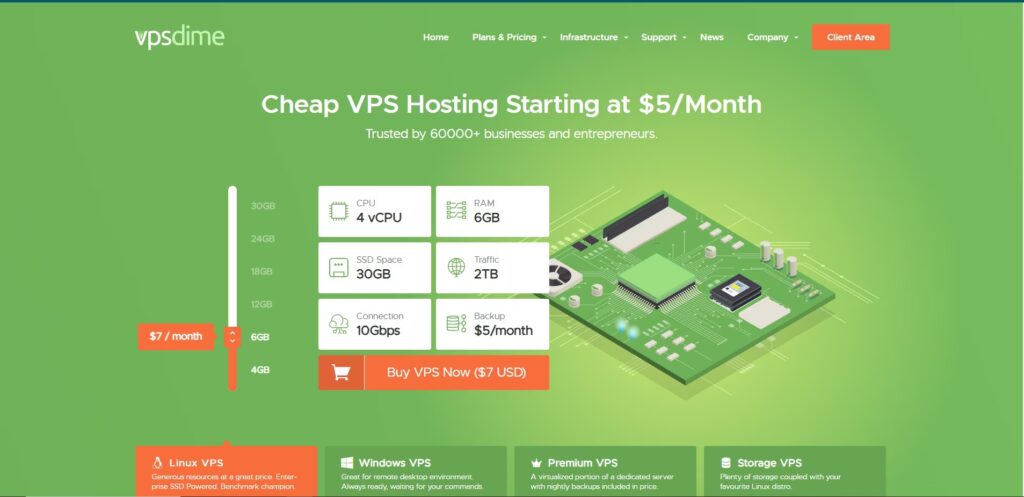
VPSDime is a budget VPS provider known for giving a lot of RAM and resources for the price. It is a practical choice if you want an affordable server for hosting, tools, bots or a Bitcoin-related app and do not need managed services.
Best for: budget-conscious users, hobby projects, self-hosted apps and workloads that need more memory than typical low-cost plans offer.
VPSDime pros
- Low prices with generous RAM allocations
- Simple plans with full root access
- Cryptocurrency payments supported (confirm accepted coins at checkout)
VPSDime cons
- Unmanaged, with no managed services or free migrations
- Limited locations compared with Vultr or BitLaunch
- Not an anonymous host, so account details are required
| Feature | Details |
|---|---|
| Crypto accepted | Bitcoin (confirm accepted coins at checkout) |
| Locations | Limited US-based locations |
| Pricing | Low-cost, high-RAM plans |
| Server type | Unmanaged VPS, full root access |
| Best for | Budget and self-hosted projects |
VPSDime at a glance
7. Hostinger: Best for Beginners
Website: www.hostinger.com
Hostinger is the easiest option here for first-time VPS users. It offers beginner-friendly KVM VPS plans, ready-made templates and 24/7 support, and can accept cryptocurrency on selected plans and billing periods.
Best for: beginners, website owners moving up from shared hosting, and users who want templates and a simple panel.
Hostinger pros
- Easy panel, OS templates and one-click setups
- 24/7 support
- Servers across multiple continents
Hostinger cons
- Crypto is only available on selected plans or billing periods, so confirm at checkout
- Not anonymous, as account details are required
- Renewal prices are higher than introductory prices
| Feature | Details |
|---|---|
| Crypto accepted | Selected plans and billing periods (confirm at checkout) |
| Locations | Multiple regions across several continents |
| Server type | KVM VPS with a beginner-friendly panel, root access |
| Anonymity | Low |
| Support | 24/7 |
Hostinger at a glance
8. Ultahost: Best Managed VPS With Free Migration
Website: ultahost.com
Ultahost offers managed and unmanaged VPS plans, accepts Bitcoin and other cryptocurrencies, and includes free SSL and site migration. It earns a place for ease of use, though it is less privacy-focused than the hosts above.
Best for: website owners who want a managed option, free SSL and free migration while still paying with crypto.
Ultahost pros
- Managed and unmanaged VPS options
- Free SSL certificates and free site migration
- Full root access and locations in the USA, Germany, UK, Canada and the Netherlands
- 24/7 live chat and ticket support
Ultahost cons
- Not built around anonymity
- Fewer privacy-focused features than BitLaunch or OrangeWebsite
| Feature | Details |
|---|---|
| Crypto accepted | Bitcoin and other major coins |
| Locations | USA, Germany, UK, Canada, Netherlands and more |
| Starting price | From about $5.50/month |
| Server type | Managed and unmanaged VPS |
| Extras | Free SSL, free migration, root access |
| Support | 24/7 live chat and tickets |
Ultahost at a glance
Best Bitcoin VPS by Use Case
| If you need | Choose | Why |
|---|---|---|
| Anonymous VPS hosting | BitLaunch | Email-only signup and 50+ cryptocurrencies |
| Privacy and free-speech hosting | OrangeWebsite | Iceland’s strong data-protection laws |
| A VPS for developers or trading bots | Cherry Servers or Vultr | Hourly billing, root access and API control |
| Servers in many regions | Vultr or BitLaunch | 30+ and 20+ locations respectively |
| A beginner-friendly VPS | Hostinger | Templates, simple panel and 24/7 support |
| A cheap, high-RAM server | VPSDime | Low prices with generous memory |
| A short-term server | Vultr or Cherry Servers | Hourly billing, so you only pay while it runs |
| Predictable long-term pricing | InterServer | Price lock guarantee |
| Managed VPS with free migration | Ultahost | Managed plans, free SSL and migration |
What Is an Anonymous Bitcoin VPS, and How Private Is It?
An anonymous VPS is a virtual private server you can rent without handing over your real identity. Typically you sign up with just an email address and pay with cryptocurrency, which keeps your name, address and bank details out of the host’s records. It is worth being realistic about what this does and does not protect:
- Bitcoin is pseudonymous, not anonymous. Every transaction is public on the blockchain, so use a fresh wallet address and avoid linking it to your identity.
- Hosts still enforce rules. Every provider has an Acceptable Use Policy, and offshore hosting does not make illegal activity safe.
- Your server is still traceable to the host. Privacy-friendly jurisdictions help, but they do not make your server invisible.
- Policies change. Some hosts add verification checks over time, so read current terms before you buy.
Why Server Location Matters
Countries such as Iceland, the Netherlands, Switzerland and Romania are popular for privacy because of their data-protection and press-freedom laws. For performance, pick a data center close to your users, or add a CDN for global reach.
How to Choose a Bitcoin VPS Provider
- Check the payment flow. Look for direct Bitcoin support, confirmation times and whether you top up a balance or pay per invoice.
- Read the refund policy. Crypto refunds are often limited or issued as account credit.
- Choose managed or unmanaged. Unmanaged is cheaper and gives full control, while managed handles updates and security for you.
- Confirm root access. KVM virtualization with full root access gives the most flexibility.
- Match the location to your audience. Closer servers mean lower latency.
- Look at billing options. Hourly billing suits testing, while monthly or yearly billing suits long-running servers.
- Review the Acceptable Use Policy. Make sure your use case is allowed before you pay.
Can You Run a Bitcoin Node on a VPS?
Yes. Many people use a VPS to run a Bitcoin node, a Lightning node or a wallet backend. The main requirements are storage, memory and bandwidth.
| Setup | Typical needs | Notes |
|---|---|---|
| Pruned Bitcoin node | A few GB of NVMe storage, 2 GB+ RAM | Validates blocks but stores only recent data |
| Full Bitcoin node | Several hundred GB of SSD or NVMe storage and growing, 4 GB+ RAM | Stores the full blockchain; check the current chain size before choosing a plan |
| Lightning node | Reliable uptime, 2 to 4 GB RAM, stable network | Channels need the node to stay online |
| Trading bot or crypto app | 1 to 2 vCPU, 2 GB+ RAM | Choose a region close to the exchange or API you use |
Check the current blockchain size and your provider’s bandwidth limits before you deploy.
Frequently Asked Questions About Bitcoin VPS Hosting
Can I buy a VPS with Bitcoin?
Yes. Many hosting providers accept Bitcoin at checkout, either directly or through a payment processor. BitLaunch, Cherry Servers and OrangeWebsite all accept Bitcoin, and others such as Vultr, InterServer, VPSDime and Hostinger offer crypto payments, sometimes on selected plans.
Which VPS provider is best for paying with Bitcoin?
BitLaunch is our top pick for most people because it accepts 50+ cryptocurrencies, needs only an email to sign up, and gives you access to several infrastructure providers. Cherry Servers is the best alternative for developers who want hourly billing.
What is an anonymous VPS?
An anonymous VPS is a server you can buy without giving real identity details, usually by paying with cryptocurrency and signing up with only an email address. It reduces how much personal data the host holds, but you must still follow the host’s Acceptable Use Policy.
Is a Bitcoin VPS really anonymous?
Not automatically. Bitcoin transactions are public on the blockchain, hosts may run fraud checks, and your server’s IP address can be traced to the provider. For better privacy, use a fresh wallet address, avoid reusing personal details and pick a host with minimal-data signup.
Can I get a refund if I pay with Bitcoin?
Often not. Many hosts limit or refuse refunds on crypto payments, or return them as account credit. Read the refund policy before you pay and start with a short billing period.
How long does a Bitcoin payment take to activate my VPS?
It depends on the host and network congestion. Most providers activate the server after a small number of blockchain confirmations, which can take from a few minutes to an hour or more.
Can I run a Bitcoin node on a VPS?
Yes. A pruned node needs little disk space, while a full node needs several hundred gigabytes of growing storage. Choose a VPS with enough NVMe storage, at least 2 to 4 GB of RAM and generous bandwidth.
Do I need KYC to rent a VPS with crypto?
It depends on the provider. BitLaunch asks for very little at signup, while Vultr, InterServer, Hostinger and Cherry Servers may request account or identity verification. Policies change, so check each host’s current terms.
Final Verdict: Which Bitcoin VPS Should You Choose?
For most people, BitLaunch is the safest and most flexible way to spend Bitcoin on a VPS. It supports 50+ cryptocurrencies, needs only an email address to sign up, and lets you choose between several infrastructure providers from one dashboard. In my own experience, support was fast and the dashboard was easy to use.
If you are a developer or work with a team and want hourly billing and full control, Cherry Servers is the better fit. It has plenty of developer-friendly options, but it can feel overwhelming for beginners, and it may ask you to verify your identity, so it is not a pure no-KYC option.
Whichever host you choose, check the crypto refund policy first, start with a short billing period, and secure your server as soon as it goes live.
Update Log
- October 2026: Completely rewritten for 2026. Removed providers that no longer meet our standards and added Vultr, InterServer, VPSDime and Hostinger.